-
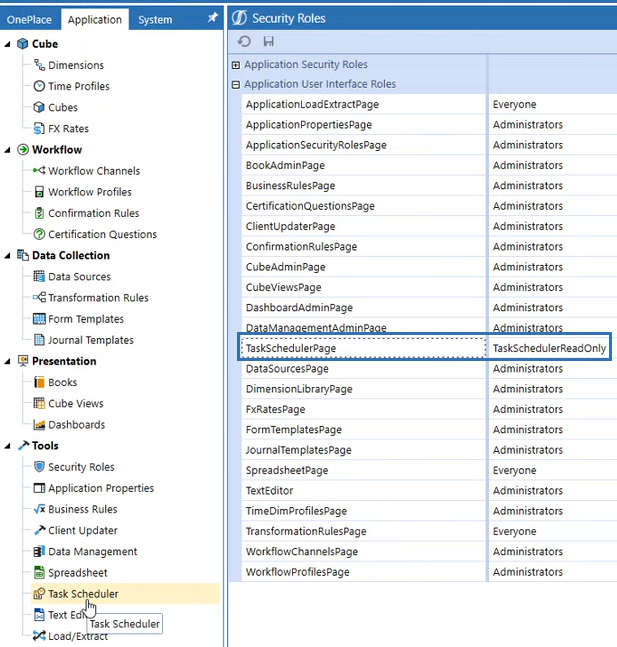
Go to Application > Tools > Security Roles > Application User Interface Roles.
-
You must have the TaskSchedulerPage role to see the Task Scheduler page. You can only view all user tasks with this role.
-
Go to Application Security Roles and you will see ManageTaskScheduler and TaskScheduler.
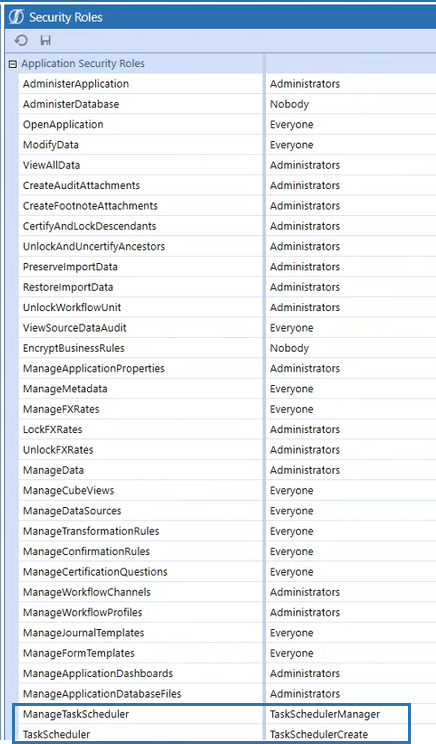
TaskScheduler allows you to create new tasks, edit your tasks, validate tasks if the setting is on. You can view all user tasks but only edit your own. You will not have access to load and extract. You cannot change the task name.
ManageTaskScheduler allows you to create your own tasks, view every task no matter who created it, edit your own tasks and other user’s tasks, delete or disable your own tasks.You can load and extract. You cannot change the task name.